debugDDe (1158408), страница 4
Текст из файла (страница 4)
The following structure is used to describe program execution context:
| typedef struct _tag_CONTEXT | ||||
| { | ||||
| byte | Rank; | |||
| byte | Type; | |||
| int | No; | |||
| byte | ItersInit; | |||
| long | Iters[MAXARRAYDIM]; | |||
| s_REGULARSET | Limits[MAXARRAYDIM]; | |||
| } | CONTEXT; | |||
| Rank | – | loop rank. | ||
| Type | – | type of structure: task region, parallel or sequential loop | ||
| No | – | unique structure number | ||
| ItersInit | – | defines, whether at least one iteration of a loop or at least on task of task region was executed. The given flag is important for parallel structures, where between the beginning of a structure and first iteration the additional definitions can be. | ||
| Iters | – | array of current values of loop iteration variables. | ||
| Limits | – | array of initial, last and step values of iteration variables. | ||
Each CONTEXT structure describes one loop of the program. The sequence of such structures completely describes a current program execution context and order of a loop enclosure.
The global table gContext is used for storage the sequence of CONTEXT structures in the system. The root context with number zero is put to the gContext when system is initialized. This context corresponds to main() program procedure.
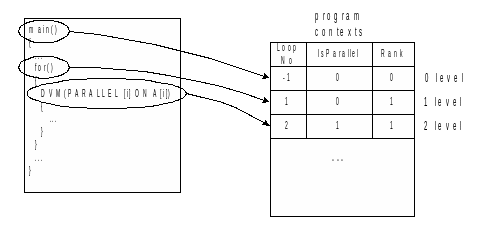
Figure 3. Program execution contexts representation
The following functions are intended to work execution context:
| void cntx_Init(void) |
The function initializes global variables that are used to work with execution contexts. This function also initializes the root context with zero number corresponding to the main program branch.
| void cntx_Done(void) |
The function uninitializes global variables used for the work with execution contexts.
| void cntx_LevelInit(int No, byte Rank, byte Type, long* pInit, long* pLast, long* pStep) | ||
| No | – | unique structure number |
| Rank | – | loop rank |
| Type | – | structure type: task region, parallel or sequential loop; |
| pInit | – | array of initial values of iteration variables |
| pLast | – | array of final values of iteration variables |
| pStep | – | array of steps of iteration variables |
The function defines a new program execution context. The function is called when the program begins execution of a new parallel or sequential loop or task region.
| void cntx_LevelDone(void) |
The function defines completion of the current program execution context. The function is called when leaving a parallel or sequential loop or task region.
| void cntx_SetIters( AddrType *index , long IndexTypes[] ) | ||
| index | – | array of current iteration variable values. The rank of the array is equal to current structure rank |
| IndexTypes | – | array of index variable types |
The function updates values of iteration variables. The function is called when a new iteration or parallel task begins.
| CONTEXT *cntx_CurrentLevel(void) |
The function returns pointer to current context definition.
| CONTEXT *cntx_GetLevel( long No ) | ||
| No | – | context number |
The function returns pointer to context definition with the specified context number.
| long cntx_LevelCount(void) |
The function returns count of registered program execution contexts.
| long cntx_GetParallelDepth(void) |
An enclosure depth of program parallel constructions (parallel loops and task regions) is returned.
| int cntx_IsInitParLoop(void) |
The function returns current parallel structure execution state.
| long cntx_GetAbsoluteParIter(void) |
The function returns absolute index of current executed loop iteration. For task regions the function returns number of current executed task.
| int cntx_IsParallelLevel(void) |
The function returns not zero value if it is called in the context of parallel loop or parallel task.
| CONTEXT* cntx_GetParallelLevel(void) |
The function returns most nested executed parallel context. It returns NULL if there is no currently executed parallel context.
| char *cntx_FormatLevelString( char* Str ) | ||
| Str | – | pointer to string buffer. |
The function forms description of current loop execution context and puts it into the Str string. The function returns pointer to the end of formed string.
4.4.2Diagnostics output functions
Dynamic debugger outputs error diagnostic when it is detected. The messages are printed to a screen or file dependently on parameters of dynamic debugger and modes of DVM system. The repeated error in the same context is printed only once. After completion of a program the dynamic debugger outputs summary information about all found errors with a count of error repetition.
The common structure of error message is following:
(<process number>)<context> File: <file>, Line: <line>
(<count> times)<error message>
where
<process number> – process number where the error occurs.
<context> – context of the error. It can have one of the following forms:
Sequential branch – the error occurs in sequential branch of program
Loop( No(N1), Iter(I1,I2,…) ), …, Loop( No(Nm), Iter(I1,I2,…) ) – the error occurs in structure of m nested level.
<file> – file name where the error occurs.
<line> – line number where the error occurs.
<count> – count of error repetition in the same context. It is printed in the summary information.
<error message> – description of the error.
The following structure is intended to store an error description:
| typedef struct _tag_ERROR_RECORD | ||||
| { | ||||
| int | StructNo; | |||
| long | CntxNo; | |||
| char | Context[MAX_ERR_CONTEXT]; | |||
| char | Message[MAX_ERR_MESSAGE]; | |||
| char | File[MAX_ERR_FILENAME]; | |||
| unsigned long | Line; | |||
| int | Count; | |||
| } | ERROR_RECORD; | |||
| StructNo | – | current structure number. It is equal –1 if there is no current executed program structure. | ||
| CntxNo | – | current program execution context number. It is calculated as the following: cntx_LevelCount() – 1. | ||
| Context | – | context description string | ||
| Message | – | error message string | ||
| File | – | file name | ||
| Line | – | line number | ||
| Count | – | count of errors of the same type occurred in the same program execution context | ||
The following structure is intended to store detected errors:
| typedef struct _tag_ERRORTABLE | ||||
| { | ||||
| TABLE | tErrors; | |||
| int | MaxErrors; | |||
| int | ErrCount; | |||
| } | ERRORTABLE; | |||
| tErrors | – | the table that contains ERROR_RECORD type elements | ||
| MaxErrors | – | maximum number of processed errors; | ||
| ErrCount | – | current number of detected errors. | ||
The following functions are intended for work with diagnostics output:
| void error_Init(ERRORTABLE* errTable, int MaxErrors) | ||
| errTable | – | pointer to initialized table of diagnostics; |
| MaxErrors | – | maximum number of processed errors. |
The function initializes the table of diagnostics.
| void error_Done(ERRORTABLE* errTable) | ||
| errTable | – | pointer to table of diagnostics |
The function uninitializes the table of diagnostics and frees memory allocated for table of diagnostics.
| ERROR_RECORD *error_Put(ERRORTABLE* errTable, char* File, unsigned long Line, char* Context, char* Message, int StructNo, long CntxNo) | ||
| errTable | – | pointer to table of diagnostics |
| File | – | file name |
| Line | – | line number |
| Context | – | context description string |
| Message | – | error message |
| StructNo | – | structure number |
| CntxNo | – | program execution context number |
The function puts a new error message into the table of diagnostics. The function returns pointer to error diagnostic record in the table.
| ERROR_RECORD *error_Find(ERRORTABLE* errTable, char* File, unsigned long Line, char* Message, int StructNo, long CntxNo) | ||
| errTable | – | pointer to table of diagnostics |
| File | – | file name |
| Line | – | line number |
| Message | – | error message |
| StructNo | – | structure number |
| CntxNo | – | program execution context number |
The function searches the error message with the specified parameters in the table of diagnostics. The function returns pointer to found error diagnostic record or NULL if error message was not found.
| byte error_Message(char* To, ERRORTABLE* errTable, char* File, unsigned long Line, char* Context, char* Message) | ||
| To | – | the file name, for diagnostics output. If this parameter is equal to NULL then the STDERR stream is used. |
| errTable | – | pointer to table of diagnostics |
| File | – | file name |
| Line | – | line number |
| Context | – | context description string |
| Message | – | error message |
The function registers a new error message in the table of diagnostics. If the table does not have a message with the specified parameters then the message will be put into the table and written into the specified file. Otherwise, the Count field of the corresponded record will be incremented only.
| byte error_Print(char* To, ERROR_RECORD* pErr) | ||
| To | – | the file name, where the diagnostic message will be put. If this parameter is equal to NULL then the STDERR stream will be used |
| pErr | – | pointer to the error diagnostic record. |
The function writes the specified error message into the file.
| void error_PrintAll( char *To, ERRORTABLE *errTable ) | ||
| To | – | the file name, where the diagnostic message will be put. If this parameter is equal to NULL then the STDERR stream will be used |
| errTable | – | pointer to table of diagnostics |
The function writes all error messages from the table of diagnostics into the specified file.
| void error_DynControl( int code, ... ) | ||
| code | – | error code |
The function registers a new detected error of dynamic control module.
| void error_DynControlPrintAll(void) |
The function outputs all error messages of dynamic control module.
| void error_CmpTrace( char *File, unsigned long Line, int code ) | ||
| File | – | trace file name |
| Line | – | line number of trace |
| code | – | error code |
The function registers a new detected error about trace or loop description file structure.
| void error_CmpTraceExt( long RecordNo, char *File, unsigned long Line, int code, ... ) | ||
| RecordNo | – | trace record number in the trace file |
| File | – | trace file name |
| Line | – | line number of trace |
| code | – | error code |
The function registers a new detected error of comparing execution results module.
| void error_CmpTracePrintAll(void) |
The function outputs all error messages of comparing execution results module.
5Dynamic control of DVM-directives
All data, which can be used in the DVM-program, are divided into the following classes:
-
Private variables. Each parallel branch (the group of parallel loop iterations or parallel task) has its own local copy of the variable and works only with this copy. The variable has undefined value when entering and when leaving a parallel construction. Such variables must be initialized inside each loop iteration and each task.
-
Read-only variables. These variables are used inside a parallel construction for reading only.
-
Reduction variables. Each parallel branch has its own local copy of the variable. After the completion of parallel construction Lib-DVM calculates reduction function for all local copies of the variable. The result is broadcasted to all processors.
-
Distributed array. The array elements are mapped on the different processors. Each parallel branch can read and modify only elements that are located on its own processor. It also can read elements of shadow edges.
-
Remote data buffer. It contains part of distributed array elements used only for reading by the parallel branch on its own processor.
The control algorithms are based on these data classes.
5.1Checking initialization of variables and elements of distributed arrays
This inspection is performed for all classes of data. Each variable has its initialization flag (the array has the array of flags). When variable is modified the flag is set. When the variable is read the flag setting is checked.
5.2Checking access to elements of distributed arrays
Each element of created distributed array is provided by a correspondent structure, describing access type to the element (read or write) and a last loop iteration or last parallel task, where this access occurred. Entering a parallel construction all these structures are initialized by a default status that means that element is not used yet. When an element is used inside a parallel loop or task the number of iteration or task and access type are stored for this element. If an element is modified inside one iteration or task and then used inside another iteration or task the undeclared data dependence error is detected.

















