28068-1 (661491), страница 2
Текст из файла (страница 2)
The file you are appending from is assumed to be a FoxPro table with a .DBF extension. If the file you want to append from is a FoxPro table and doesn't have a .DBF extension, you must specify its extension. If the file is a not a FoxPro table, you must specify the type of file you append from.
Before you can append from a table created in dBASE IV that contains a memo field, you must first open the table in FoxPro with USE. You are prompted with "Convert MEMO file to FoxPro Format?" Choose Yes.
If you append from a FoxPro table, the table you append from can be open in another work area. You can also append from a table that isn't open but is available on disk and a shared table opened when SET EXCLUSIVE is OFF. When the table you append from contains records marked for deletion, the records are not marked for deletion after they are appended.
If you include the ? clause instead of including a table name, the Open dialog appears so you can choose a table to append from.
Clauses
Specify the name of the file to append from with . If you don't include a file name extension, the default extension .DBF is assumed.
FIELDS
APPEND FROM supports an optional . Data is only appended to the fields specified in the field list.
FOR
The entire source file is appended to the table unless you include the FOR clause. If the FOR clause is included, a new record is appended for each record in the file source for which evaluates to a logical true (.T.). Records are appended until the end of the file is reached.
TYPE
If the file you are appending from isn't a FoxPro table, you must specify the file TYPE. Although you must specify the file type, you need not include the key word TYPE. You can append from a wide variety of different file types including DELIMITED ASCII text files in which you can specify a field delimiter.
If the file you are appending from doesn't have the usual default file extension for that type of file, the source file name must include the file's extension. For example, Microsoft Excel spreadsheets normally have an .XLS file name extension. If the spreadsheet you are appending from has an extension other than the expected .XLS, be sure to specify the extension.
Caution When appending from a spreadsheet, the data in the spreadsheet must be stored in a row major order rather than a column major order. This allows the appended spreadsheet data to match the table structure.
DELIMITED [WITH TAB | WITH | WITH BLANK]
A DELIMITED file is an ASCII text file in which each record ends with a carriage return and line feed. Field contents are by default assumed to be separated from each other by commas, and character field values to be additionally delimited by double quotation marks. For example:
"Smith", 9999999, "TELEPHONE"
The DELIMITED WITH TAB option can be used to specify files which contain fields separated from each other by tabs rather than commas. The DELIMITED WITH option can be used to indicate that character fields are delimited by a character other than the quotation mark. The DELIMITED WITH BLANK option can be used to specify files which contain fields separated by spaces instead of commas. The file extension is assumed to be .TXT for all delimited files.
You can import dates from delimited files if the dates are in proper date format. The date format defaults to 'mm/dd/yy'. Including the century portion of a date is optional. FoxPro will import a date that includes the century. If the century isn't included in a date (for example '12/25/92'), the Twentieth century is assumed. Date delimiters can be any non-numeric character except the delimiter that separates the fields in the delimited file.
Dates in other formats can be imported if their format matches a date format available in SET DATE. To import dates that are not in the default format, issue SET DATE with the proper date format before using APPEND FROM. To test if a date format can be successfully imported, use it with CTOD( ). If the date is acceptable to CTOD( ), the date will import properly.
FW2
FW2 files are created by Framework II. FW2 file names are assumed to have a .FW2 extension.
RPD
RPD files are created by RapidFile version 1.2. RPD file names are assumed to have an RPD extension.
SDF
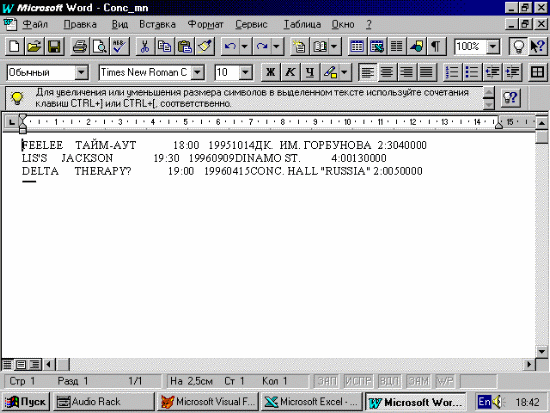
An SDF (System Data Format) file is an ASCII text file in which records have a fixed length and end with a carriage return and a line feed. Fields are not delimited. The file name extension is assumed to be .TXT for SDF files.
WK3
Data from a Lotus 1-2-3 spreadsheet. Each column from the spreadsheet becomes a field in the table; each spreadsheet row becomes a record in the table. A .WK3 file name extension is assigned to a spreadsheet created in Lotus 1-2-3 revision 3.x.
2.2. OLE.
Another method of data exchange between not only FoxPro but between all Windows based applications is OLE (OBJECT LINKING AND EMBEDDING)
First you can use a FoxPro built in command Append General.
APPEND GENERAL FROM
[LINK]
[CLASS ]
APPEND GENERAL is supported in FoxPro for Windows only.
If an OLE object already exists in the general field, it is replaced with the OLE object from the file.
Clauses
Include to specify the name of the general field the OLE object is placed in. You can specify a general field in a table open in a noncurrent work area by including the table alias with the field name.
Include to specify the file containing the OLE object. You must include the entire file name, including its extension. If the file is located in a directory other than the current default directory, include the path with the file name.
LINK
If LINK is included, a link is created between the OLE object and the file that contains the object. The OLE object appears in the general field but the object's definition remains in the file. If LINK is omitted, the OLE object is embedded in the general field.
CLASS
Include the CLASS clause to specify an OLE class for an OLE object other than the default class.
Tip To determine the class for an OLE object, run REGEDIT and double-click on the OLE object. The class name is listed under Identifier.
You can specify a class name when the file extension for the file containing the OLE object is different than the default extension and you want to force the behavior for the class. If the default extension can be used by multiple OLE servers, include the class to specify a particular server.
3. Practical usage of data transfer.
In applications you can find the examples of the above mentioned commands usage and their results in different Microsoft Applications (FoxPro, Word & Excel).
-
Technical facilities & literature used.
During creating this program the following equipment & software was used:
Pentium 100 MHz PC with 8 Mb RAM
Microsoft Windows’95
Microsoft Visual FoxPro 3.0
Microsoft Word 7.0
Microsoft Excel 7.0
Printer Hewlett Packard LaserJet5L
No special literature but build-in HELP of Visual FoxPro 3.0, Word 7.0, Excel 7.0 & useful advices was used to create this laboratory work.
5. Applications.
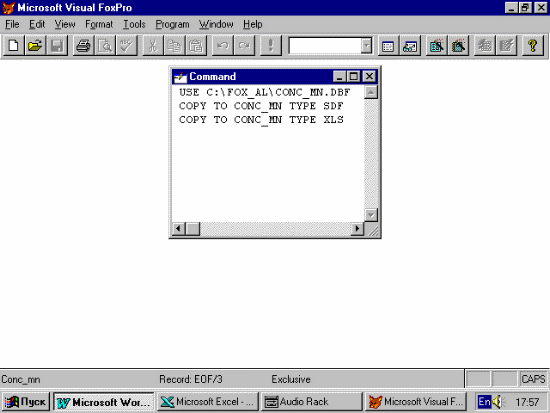
Application 1 “Transfering data form FoxPro to Word & Excel”
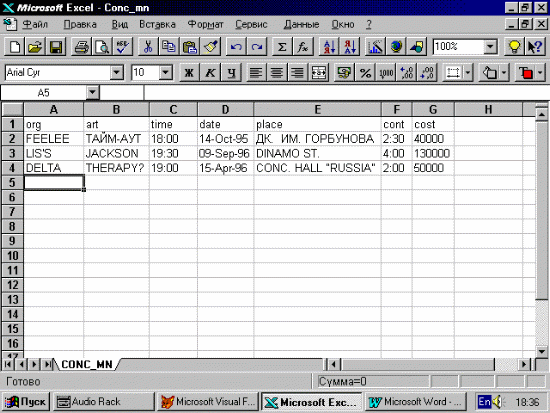
Application2 “FoxPro database converted to Excel (.xls) file”
Application 3 “FoxPro database converted to Word (.sdf) file”
Application 4 “FoxPro base converted in Word file - in Excel”
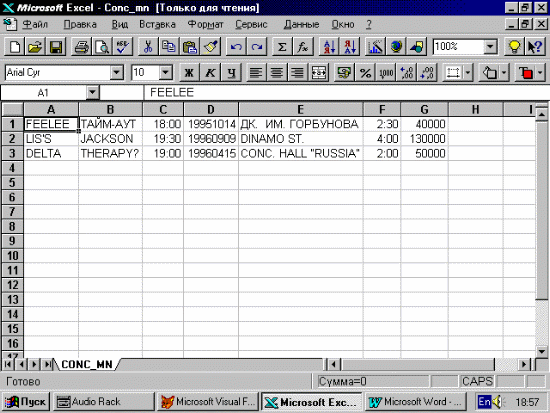
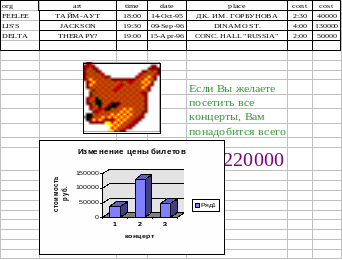
Application 5 “Excel file in Word”